CNC4Newbie
CNC4Newbie PRO48xxRP
Rack-and-pinion CNC kit with a standard HD ballscrew Z axis, four kit sizes under one Easel entry
Use with Easel Pro →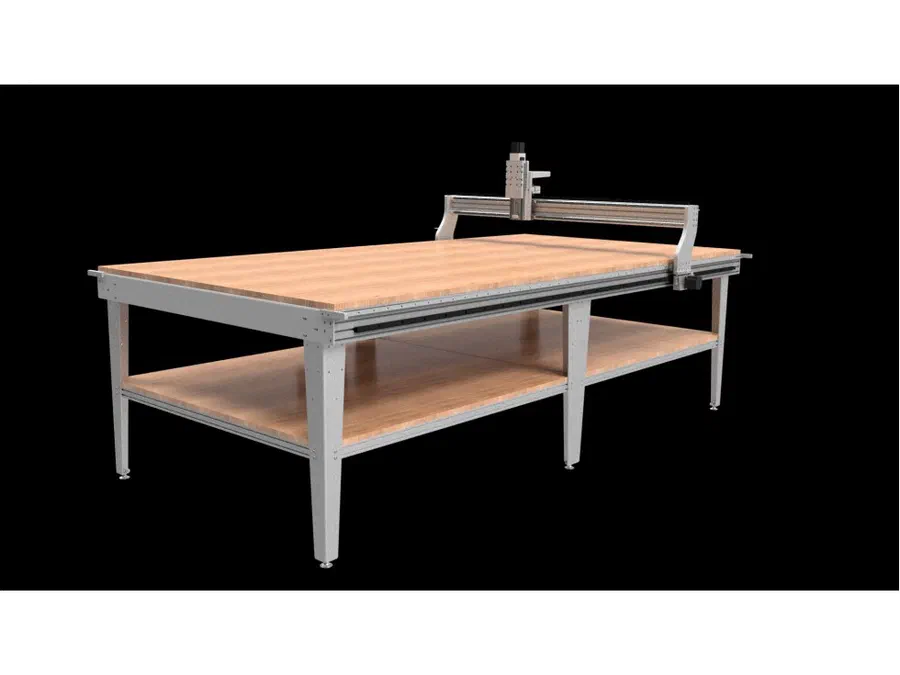
About the Machine
The PRO48xxRP covers four kit sizes sold on one product page: 4824 at 50 x 25 x 8 in, 4836 at 50 x 37 x 8 in, 4848 at 50 x 49 x 8 in, and 4896 at 50 x 99 x 8 in (footprint 62.5 x 34.5 in up to 62.5 x 106.5 in depending on size, using a 3/4in MDF wasteboard). It runs rack-and-pinion drive with a belt reduction box on X/Y, 15mm square linear bearings on every axis, and now ships standard with an HD 6in-wide ballscrew Z axis that can take a spindle up to 3kW, not included; mount options run from 65mm up to 89mm.
Cut Settings on this Machine
Every cut starts with one formula: Feed Rate = Spindle Speed (RPM) x Chip Load x Number of Cutting Edges (flutes). Chip load is the thickness of material each cutting edge removes in one revolution of the bit. This number comes from the manufacturer of the bit, which publishes a chip-load chart for each bit diameter and material. Look up your exact bit and material, start from the middle of the published range, and you have the third number in the formula. The chart below shows the recommended spindle speed for each material and bit type.
| Material | Solid carbide bit (RPM) | HSS & carbide-tipped bit (RPM) |
|---|---|---|
| Plastic (hard & soft) | 18,000 | 8,000 |
| Soft woods (MDF, particleboard, etc.) | 22,000 | 10,000 |
| Hard wood (oak, maple, etc.) | 16,000 | 7,000 |
| Aluminum | 12,000-14,000 | 5,500 |
| Aluminum, softer grades (such as 3003) | 10,000 | 5,000 |
| Foam (harder foams; soft foams do not rout well) | 18,000 | 8,000 |
| Composites | 12,000 | 5,000 |
If this machine's spindle cannot reach the listed speed, run the spindle at its maximum and control the cut with feed rate. For 65mm trim routers, the DeWalt DW611 dial maps to: 1 = 16,000; 2 = 18,200; 3 = 20,400; 4 = 22,600; 5 = 24,800; 6 = 27,000 RPM.
The PRO48xxRP ships without a spindle, so its top RPM depends on whatever unit you mount, up to 3kW, check that unit’s own rating plate against the chart rather than assuming a number. Its rack-and-pinion X/Y drive and 15mm square linear bearings on every axis, plus a standard HD 6in-wide ballscrew Z axis, are built for real rigidity. A truly rigid machine with a powerful spindle can cut as deep as the bit is wide in a single pass, but that takes real spindle torque, a drive train and clamps that hold firm, a gantry that will not flex, and enough mass to soak up vibration. With a suitable spindle mounted, the PRO48xxRP can handle solid depth per pass, but still build up gradually. Push too deep and the bit deflects and chatters, leaving scalloped edges, or it rubs instead of cutting and burns the material. The fastest way to dial in a cut is to see what has already worked for other people.
Worked example for feed rate: 1/8in (3.175mm) two-flute solid carbide end mill in hard wood. The chart says 16,000 RPM. With the bit maker’s 0.025mm per tooth (0.0010 in): 16,000 x 0.025 x 2 = 800 mm/min (31 in/min) feed. For depth per pass, start shallow and check Community Cut Settings in Easel for what works on the CNC4Newbie PRO48xxRP. If the cut sounds strained, reduce the depth, not the feed. Slowing the feed below the chip load makes the bit rub instead of cut.
Community Cut Settings shows the spindle speed, feed rate, and depth per pass other makers actually run for your machine, material, and bit.
CNC has never been easier
Using this machine with Easel
The PRO48xxRP ships with one of three non-GRBL electronics packages depending on configuration: a Gecko540/UC100 stack or a UC400ETH setup running UCCNC (Mach3-style PC control software), or a Masso G3 Touch standalone controller for other builds. Since none of these is GRBL or FluidNC, Easel’s live Driver connection and driverless Rapid Connect do not apply here; instead, set up a Non-GRBL Machine Profile in Easel, design your project, then use Project > Download G-code to save an .nc file. If your machine runs UCCNC (the Gecko540/UC100 or UC400ETH setups), open that exported .nc file directly in UCCNC on the PC wired to the machine and run the job from there. If your machine runs a Masso G3 Touch, transfer the .nc file to the controller over its built-in WiFi via Masso Link, or by USB drive, and run it from the touchscreen.
Try Easel Free →Start creating with your CNC
Create your free Easel account and connect your machine in minutes.
Easel Free Trial →